Showing posts with label autosuggest. Show all posts

Monday, May 7, 2018

In Defense of AutoSuggest Dictionaries in the Time of Fragment Matches

I have seen some arguments that favor forgetting all about AutoSuggest Dictionaries now that we have UpLift fragment matching in SDL Trados Studio, and since I can't agree with this, I thought I'd write about why I think both should coexist instead.

I'll start this post by clarifying the difference between AutoSuggest and AutoSuggest Dictionaries.

AutoSuggest
This is SDL Trados Studio's functionality that allows the user to receive suggestions from multiple sources after typing the first letter or letters of the intended translation.

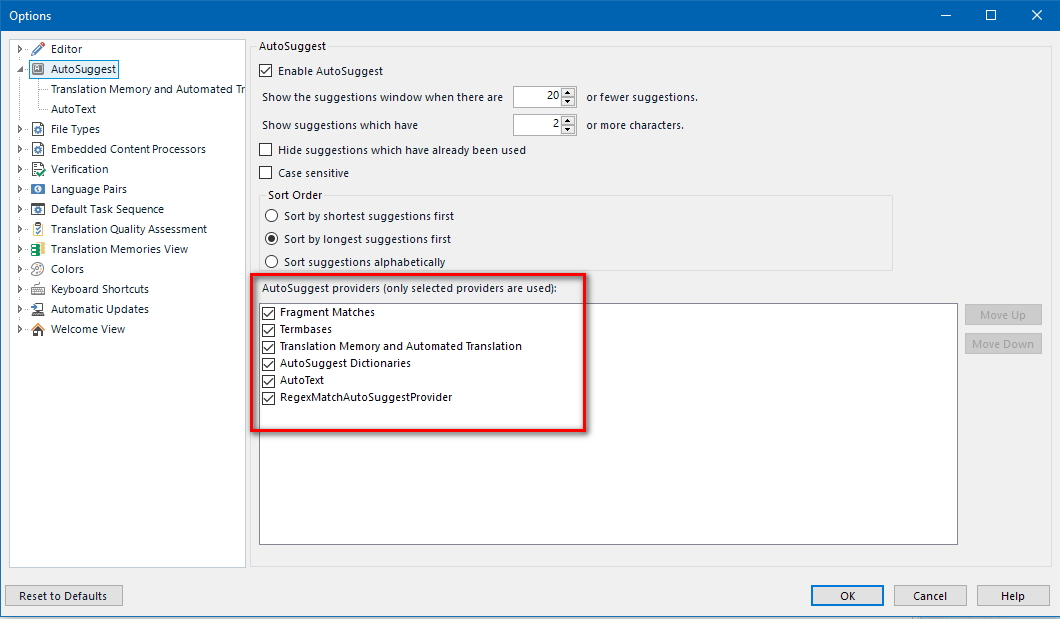
AutoSuggest settings are accessed via Options - AutoSuggest. Here, one can decide which providers to enable by checking or unchecking the appropriate boxes. Further settings are available for the Translation Memory and Automated Translation provider, where one can decide whether fuzzy and concordance matches should be used, for example.

AutoSuggest Dictionaries
As we can see in the screenshot above, AutoSuggest Dictionaries are one of the AutoSuggest providers one can use.

AutoSuggest Dictionaries need to be created by selecting a translation memory and following the Create AutoSuggest Dictionary wizard found in the Translation Memories view. Once the creation process is started, Studio will automatically handle phrase extraction with no user intervention.


At the end of the process, a *.bpm file will have been created, which will then need to be added via Options/Project Settings-Language Pairs-Specific Language Pair to be available as an AutoSuggest provider.


There are two things worth noting here:

  1. The actual contents of the AutoSuggest Dictionary are somewhat of a mystery, as one cannot browse or edit the content in any way.
  2. In order to create an AutoSuggest Dictionary, Studio must have the appropriate functionality installed. However, even if a user can't create AutoSuggest Dictionaries, they can still use dictionaries shared by others.

The case for AutoSuggest Dictionaries
While the amazing technology behind fragment matches (available since Studio 2017) has made a great difference as recently entered translations are offered as AutoSuggest hits, I have found that fragment matches are not necessarily a substitute for well-curated AutoSuggest Dictionaries, as the suggestions from both sources tend to differ and in some cases AutoSuggest Dictionaries offer more relevant hits.

To illustrate this, I've collected several examples from an actual project I'm working on. The TM I'm using for this project (and where the fragment matches are coming from) is the same TM that was used to create the active AutoSuggest Dictionary. So I guess that would mean that if UpLift fragment matching really makes AutoSuggest Dictionaries redundant or obsolete, we would see the same suggestions coming from both, or, at the very least, the suggestions from the AutoSuggest Dictionary would not be as useful, right? Let's see.

Have a look at this example, where the source text contains the phrase "prescription medications", and the following AutoSuggest entries are offered.


Green icon = Termbase     Green and yellow icon = Fragment matches    Blue icon = AutoSuggest Dictionary

The backtranslation of the above is:
medications 
medications and 
medications and
medications
medications (I'm guessing, this one isn't in Spanish!)
prescription medications
prescribed medications
medications
medication

As we can see, there are suggestions coming from the termbase (1) and fragment matches (4, although the last one is certainly not Spanish), but the most valuable suggestions are the first 3 coming from the AutoSuggest Dictionary.

Here's another instance from the same project, triggered by typing the first letter for the translation of the word "treatment", where the AutoSuggest window doesn't even include any fragment matches.


Without the AutoSuggest Dictionary, all those suggestions would be lost.

And here's yet another instance, where we can see that sometimes only the AutoSuggest Dictionary returns hits.


In the example below, I get both fragment matches and AutoSuggest Dictionary hits, but while the fragment match is close, the exact one I need "salir del hospital" (no punctuation) comes from the dictionary.

I could add many more examples, but I think this illustrates my point. While fragment matches via UpLift technology are an incredibly valuable resource during translation, they do not render AutoSuggest Dictionaries obsolete or useless, and we would be doing ourselves a disservice if we stop using them because of this misconception. We should definitely take advantage of both for a richer AutoSuggest experience.



Thursday, July 23, 2015

A Collection of Regular Expressions for the Regex Match AutoSuggest Provider

The Regex Match AutoSuggest Provider app is one of my absolute favorite add-ons for Studio, and it has been a great reason to continue learning about regular expressions.

What does it do?
Based on rules that you can set up on-the-fly, the plug-in offers AutoSuggest proposals, as shown in this example:


Depending on how you set up your rules, the plug-in can:

  1. Offer an autosuggestion that is exactly the same as the word or phrase found in your source segment, so all you have to type is the first letter, instead of the whole thing. For example, you can have a rule that will suggest an entire phone number string, such as "1-800-012-3456", as soon as you type the first number.
  2. Offer an autosuggestion where the source text has been replaced by its translation. So, for example, when "July 22" is found in the source, "22 de julio" will be offered as an autosuggestion as soon as you type the first "2".
What do you need to use it?
First, you need to download the plug-in from the SDL Open Exchange and install it. The Regex Match AutoSuggest Provider is available for Studio 2014 (and soon for Studio 2015).

Once installed, it is found under the View tab in Studio. Clicking on the button will open the pane where you can start entering your RegEx Entries.

The developer provides a very clear explanation of the set-up here.

You can safely close this pane when you're not entering any new rules, and open it again as needed. I find it useful to have it open as I work, so I can quickly add new rules as I need them.

Some examples
Here are some rules and examples of their application, with a disclaimer: I'm a novice regex user, so please don't expect these to be the most elegant or sophisticated regex rules out there. In venturing into creating regex rules to use with Studio, I decided to follow Paul Filkin's advice about "economy of accuracy" and move past my worry of creating clunky regular expressions, so you may find some clunkiness here, but hopefully these will be useful either as they are, or as a starting point to achieve something else.

Date: First day of the month

Description
Regex Pattern
Replace Pattern
Dates: First of month Ex: July 1, 2015 --> 1° de julio de 2015
(#Months#)\s(1|1st),\s(\d{4})
1° de $1 de $3
 Note: The "#Months#" part of the expression is a reference to a variable from a list, in this case, the names of the months, another very clever feature of the plug-in. You can watch Paul Filkin's video Manipulating Dates with RegexMatch AutoSuggest for a clear explanation of this feature.


Date: Full date


Description
Regex Pattern
Replace Pattern
Dates: July 22, 2015 ---> 22 de julio de 2015
(#Months#)\s(\d{1,2}),\s(\d{4})
$2 de $1 de $3


Date: DD/MM/YY 

Description
Regex Pattern
Replace Pattern
Dates: 8/7/15 to 7/8/15
(\d{1,2})/(\d{1,2})/(\d{2})
$2/$1/$3


Date: Month and Year

Description
Regex Pattern
Replace Pattern
Month and year  Ex. July 2015 --> julio de 2015
(#Months#)\s(\d{4})
$1 de $2


Date: Day and Month

Description
Regex Pattern
Replace Pattern
Month and day w/o year. Ex. July 22 --> 22 de julio
(#Months#)\s(\d{1,2})(?!.*\d{4})
$2 de $1


1x

Description
Regex Pattern
Replace Pattern
Ex: 1x ---> 1 vez
\b1x\b
1 vez


50x

Description
Regex Pattern
Replace Pattern
Ex: 10x ---> 10 veces - excluding "1x"
(?!1x)(\d{1,2})x
$1 veces


5-6

Description
Regex Pattern
Replace Pattern
Ex: 8-10 ---> de 8 a 10
(\d{1,2})-(\d{1,2})
de $1 a $2


1-800 number

Description
Regex Pattern
Replace Pattern
Full phone numbers Ex. 1-800-123-1234
\d-(\d{3})-(\d{3})-(\d{4})
$0


8:00 a.m.

Description
Regex Pattern
Replace Pattern
Time plus a.m. or p.m. Ex. 9:00 a.m.
(\d{1,2}:\d{2})\s(a\.|p\.)m\.
$0


Numbers with backslashes


Description
Regex Pattern
Replace Pattern
Numbers with points and slashes Ex. 36.5/93
\d+\.\d+/\d+
$0


Percentages

Description
Regex Pattern
Replace Pattern
Percentages  Ex. 35%
\d{1,3}%
$0


Trademark names

Description
Regex Pattern
Replace Pattern
Words with TM Ex. AnyBrand™
\w+™
$0


Registered names

Description
Regex Pattern
Replace Pattern
Words with (R) Ex. AnyBrand®
\w+®
$0


Watch a video demonstration of the above here.


And here's the full list of the examples shown above.
Description
Regex Pattern
Replace Pattern
Dates: First of month Ex: July 1, 2015 --> 1° de julio de 2015
(#Months#)\s(1|1st),\s(\d{4})
1° de $1 de $3
Ex: 1x ---> 1 vez
\b1x\b
1 vez
Ex: 10x ---> 10 veces - excluding "1x"
(?!1x)(\d{1,2})x
$1 veces
Dates: July 22, 2015 ---> 22 de julio de 2015
(#Months#)\s(\d{1,2}),\s(\d{4})
$2 de $1 de $3
Ex: 8-10 ---> de 8 a 10
(\d{1,2})-(\d{1,2})
de $1 a $2
Dates: 8/7/15 to 7/8/15
(\d{1,2})/(\d{1,2})/(\d{2})
$2/$1/$3
Month and day w/o year. Ex. July 22 --> 22 de julio
(#Months#)\s(\d{1,2})(?!.*\d{4})
$2 de $1
Full phone numbers Ex. 1-800-123-1234
\d-(\d{3})-(\d{3})-(\d{4})
$0
Time plus a.m. or p.m. Ex. 9:00 a.m.
(\d{1,2}:\d{2})\s(a\.|p\.)m\.
$0
Numbers with points and slashes Ex. 36.5/93
\d+\.\d+/\d+
$0
Month and year  Ex. July 2015 --> julio de 2015
(#Months#)\s(\d{4})
$1 de $2
Percentages  Ex. 35%
\d{1,3}%
$0
Words with TM Ex. AnyBrand™
\w+™
$0
Words with (R) Ex. AnyBrand®
\w+®
$0


And that's all there is to it. What I like about the Regex Match AutoSuggest Provider is that it's easy to use (although some basic knowledge of regex is required) and it's project-independent, which means the entries are available all the time, for all files and projects, so it's a great way to customize Studio's autosuggestions to our individual needs.

Tuesday, June 30, 2015

Studio 2015: AutoSuggest Gets Even Better

Studio 2015 comes with significant updates to the AutoSuggest feature, which will be a welcome productivity enhancement for users.

Translation Memory and Automated Translation Suggestions in Studio 2015

In addition to Termbases, AutoSuggest Dictionaries and AutoText, Studio 2015 includes a new AutoSuggest provider: Translation Memory and Automated Translation.*

* For Automated Translation suggestions to be provided, an automated translation provider, such as Google Translate, must be added to the list of Translation Memories.


Depending on the settings we choose, we can get suggestions that are 100% matches, fuzzy matches and concordance matches that come from our very own TMs.

To access the new settings, we will find a new node under Options - AutoSuggest, where we can set our preferences.


Above, I have chosen a value of 1 under "Minimum number of characters typed before displaying suggestions" to get the most matches. A setting of 1 under "Minimum suggestion length in words" will result in many more matches than a setting of 3, for example, as it's a less restrictive criterion.

The best settings for these thresholds will depend on personal preferences and the extent of our resources. With a well-populated termbase and TM, for example, low thresholds in these settings (1 character typed, 1-word suggestions) may result in many duplicates in our suggestion list, as, for example, one-word terms that already exist in the termbase and in the AutoSuggest dictionary will also be offered as Translation Memory autosuggestions, as shown in the (extreme) example below. As a disclaimer, please note that the AutoText entry would only appear after the first four letters have been typed, so, in fact, after typing the first letter, only the first three suggestions would be offered.


With this new AutoSuggest provider, even a user who has no termbases, no AutoSuggest dictionaries and no Auto Text entries will benefit from AutoSuggest, as suggestions are offered from existing and newly added translation units, and are updated on-the-fly, as translation units are confirmed.

For the examples below, I have disabled Termbases, AutoSuggest Dictionaries and AutoText from the list of AutoSuggest providers to simulate a scenario where the only resource available to the user is the TM.


For segment 1 there are fuzzy matches in the TM, so AutoSuggest offers a fuzzy match in the list of suggestions when I type the letter "v".


Since segment 5 has no exact or fuzzy matches in the TM, AutoSuggest offers concordance matches* and automated translation suggestions as soon as I type the first letter for the segment.


*The setting that determines this behavior can be found under Options - Editor - Concordance Search Window. If this option is not checked, auto concordance is disabled and therefore AutoSuggest will not offer any concordance suggestions.


AutoSuggest in Action

The 'magic' of AutoSuggest is best appreciated in action, so below you'll find a video showing how it works.


This is definitely one of my favorite features in Studio 2015!